

What Are Access Control Systems & How Do They Work for Offices?
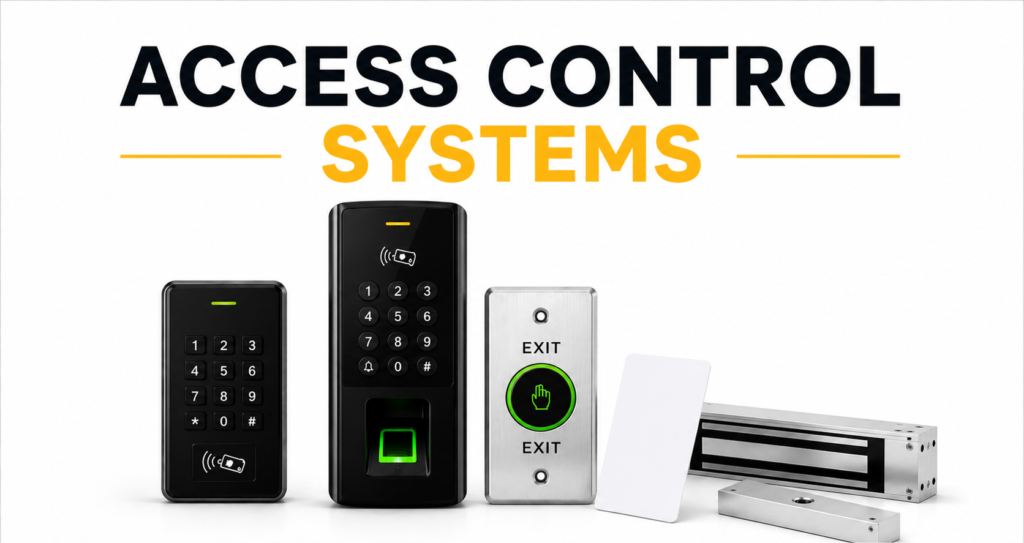
Modern office environments have evolved far beyond the classic lock-and-key system. As workplaces grow, manage hundreds of staff, adopt flexible shifting schedules, and house valuable intellectual and physical property, security infrastructure must adapt. Today’s commercial office buildings require a dynamic, automated framework that keeps unauthorized people out while letting verified employees flow through seamlessly. This is exactly what an Access Control System does.
At its core, an office access control system is a digital and physical security network designed to regulate who can enter specific zones of a building, and when. From high-throughput main lobbies to sensitive server rooms, these systems replace physical keys with digital credentials—such as smart cards, smartphone apps, or biometric scans. They log every movement, integrate with fire alarms for safety, and automate HR attendance tracking. Here is a deep dive into how these systems operate, how their individual components connect, and how they protect the modern office.
1. The Core Hardware Architecture and Wiring
H4: The Edge Devices: Readers and Electronic Locks
The physical footprint of an office access control system consists of specialized hardware installed at every monitored doorway. The most visible component is the credential reader mounted adjacent to the door frame on the unsecure side. The reader constantly awaits an input—such as an RFID card tap, a biometric scan, or a mobile Bluetooth ping. On the door itself, a heavy-duty electronic locking mechanism is installed. This is typically a magnetic lock (maglock), which uses a strong electromagnet to hold the door frame shut with up to 1,200 pounds of force, or an electric strike, which replaces the standard mechanical door faceplate and releases the latch when energized.
H5: The Central Controller and Communication Converter
Behind the scenes, tucked away in an IT closet, is the access control panel or controller. This acts as the brain of the local network. All readers, electronic locks, and exit devices (like motion sensors or push-to-exit buttons) are physically wired directly back to this control board. When a user presents a credential, the reader sends raw data down the wire to the controller. The controller processes this data, decides whether to grant access, and commands the electronic lock to release. To manage the entire facility from a desktop, a communication converter or network interface translates the controller’s serial signals into TCP/IP protocol, allowing the system to communicate directly with an office computer or cloud server.
2. The Step-by-Step Authentication Workflow
H4: Requesting Access at the Reader
The workflow of gaining access is designed to happen in milliseconds. It begins when an employee approaches a locked door and presents their credential. The reader captures the raw credentials—such as reading the microchip inside an RFID card or mapping the minutiae points on a fingerprint sensor. This raw analog signal is instantly digitized and encrypted on-board to prevent “sniffing” or intercepting. It is then forwarded as a unique identification packet to the door controller.
H5: Decision Processing and Lock Relaying
Once the controller receives the digitized ID packet, it checks its localized database to see if this specific user has clearance. The controller evaluates multiple conditions: is the card active? Is the user allowed through this specific door? Is it during their scheduled shift hours? If all checks pass, the controller activates an onboard electric relay. This relay momentarily interrupts or redirects the power supply going to the door’s magnetic lock or electric strike. The lock clicks open, the user walks through, and a magnetic door closer swings the door shut, re-engaging the lock.
3. The Spectrum of Access Credentials
H4: From Physical Tokens to Mobile Access
Office facilities can utilize several different types of credentials depending on their budget and security goals. The most traditional is the RFID Proximity Card or Key Fob. These are highly affordable and simple to hand out, though they suffer from the risk of being lost, cloned, or shared among employees. To counter this, many modern tech companies are transitioning to Mobile Access Control. This system turns an employee’s smartphone into their key using secure apps that communicate with the wall readers via Bluetooth Low Energy (BLE) or Near Field Communication (NFC).
H5: Biometric Verification and Multi-Factor Terminals
When security cannot be compromised, offices pivot to Biometric Access Control. Biometric systems rely on the unique physical characteristics of the user—most commonly facial recognition, fingerprint templates, or iris structures. Because you cannot lose or share your physical face or fingerprint, biometrics eliminate “buddy punching” (where employees clock in for each other) and prevent unauthorized badge transfers. For extreme high-security zones like research labs or server closets, Multi-Factor Authentication (MFA) is deployed, requiring a user to tap an RFID badge and pass a biometric facial scan before entry is permitted.
4. Central Software Management and Databases
H4: The Administrator Dashboard
While the physical controllers make the split-second decisions at each door, the entire system is orchestrated through centralized Video and Access Control Management Software. From a secure computer console, facilities managers and IT administrators can oversee the entire facility’s security map. The software provides a real-time activity feed: showing exactly who is entering which door, flagging doors that have been left propped open, and generating automated daily or weekly occupancy reports.
H5: Real-Time Roster Synchronization and Access Levels
The core benefit of centralized software is the ability to easily manage “Access Groups.” Instead of configuring doors one by one, administrators create profiles. For example, a “Marketing Team” profile can be configured with access only to the main lobby, marketing office, and cafeteria during weekdays. If a marketing executive leaves the company, an administrator can delete their profile in the software, and that digital command instantly propagates across all door controllers across the entire office network, immediately revoking access without having to collect a physical key.
5. Integration with HRMS and Payroll Systems
H4: Automated Time and Attendance Logging
Modern office access control systems are far more than just security barriers; they are highly integrated operational tools. Because every entry and exit log is stamped with a precise timestamp and user ID, this data can be automatically funneled directly into the company’s Human Resource Management System (HRMS). The moment an employee scans their face or taps their card at the main entrance, they are automatically clocked in for their shift, completely removing the need for manual sign-in sheets or separate time-tracking software.
H5: Managing Complex Shifting and BPO Operations
In cities with complex corporate structures, tech support operations, and global business hours, offices often run continuous 24/7/365 multi-shift rotations. Manually tracking attendance, night-shift allowances, and overtime across hundreds of workers is an administrative nightmare. By integrating access control databases with payroll systems, companies can generate flawless monthly attendance audits, automatically calculate late-arrival penalties or night-shift premiums, and ensure regulatory labor compliance.
6. Emergency Safety and Fire Alarm Integration
H4: Fail-Safe vs. Fail-Secure Lock Behaviors
When dealing with electronic doors, building safety codes dictate how locks must behave during an emergency. This is categorized into Fail-Safe and Fail-Secure operations:
Fail-Safe Locks: These locks require continuous electrical power to stay locked. If power is cut, the lock automatically releases. Magnetic locks are inherently fail-safe and are used on primary emergency exit routes to ensure no one is trapped inside during a power failure.
Fail-Secure Locks: These locks require electric power to unlock. If power is lost, they remain locked from the outside but can still be opened mechanically from the inside. Electric strikes are often configured this way to keep a building’s outer perimeter secure even during a major blackout.
H5: Automatic Fire Panel Integration
To prevent loss of life during emergencies, an office’s access control panel must be physically linked to the building’s Fire Alarm Control Panel (FACP). The moment the fire alarm system detects smoke or heat and triggers a building-wide alarm, it sends an overriding signal to the access control power supplies. This signal instantly drops all electrical power going to every fail-safe magnetic lock throughout the building. All doors swing completely free, ensuring employees can evacuate rapidly without having to look for their access badges.
7. Internal Zoning and Layered Security
H4: Building Outer and Perimeter Security Rings
An effective office layout does not treat security uniformly; instead, it uses a tiered “onion-skin” security approach. The outer ring starts at the property edge, using automated parking boom barriers and speed turnstiles in the main ground-floor lobby. This initial layer filters out the general public, delivery drivers, and non-office personnel, ensuring that only registered staff and pre-scheduled visitors can even access the elevator banks or stairs.
H5: Restricting High-Risk Internal Zones
Once inside the primary office suite, internal access doors create distinct functional boundaries. While common areas, conference rooms, and open workspaces remain unlocked for all staff, specialized departments are sequestered behind secured entry doors. Human Resources (housing physical employee records), the accounting wing (with financial ledgers), executive suites, and R&D testing labs are restricted only to employees specifically authorized to enter. This layered approach ensures that a breach in one low-security area does not compromise the company’s entire physical or digital asset base.
8. Cloud-Based Access vs. On-Premises Architecture
H4: The Traditional On-Premises Server Setup
Historically, corporate access control relied entirely on on-premises setups. This meant the database software was installed on a physical PC or server located inside the office’s server closet. This architecture is highly secure, as data stays completely local and does not rely on an external internet connection to operate. However, it requires significant IT upkeep, physical server maintenance, manual software patching, and makes managing multiple branch offices highly complex.
H5: The Flexibility of Cloud-Based Access (ACaaS)
Modern enterprises are increasingly adopting Access Control as a Service (ACaaS), which hosts the management software and database in the cloud. Cloud-based systems offer unparalleled scalability. A business can monitor and update security privileges across multiple global office branches from a single web browser interface. Furthermore, cloud systems integrate effortlessly with modern workplace tools—allowing HR teams to automatically issue temporary guest passes via email or trigger Slack notifications whenever a delivery driver arrives at the loading dock.
Quick Guide: Comparing Common Access Technologies
| Metric | RFID Proximity Cards | Mobile Smartphone Keys | Biometric Scanners |
| Security Level | Moderate | High | Exceptionally High |
| Upfront Cost | Low | Moderate | High |
| Administrative Effort | High (replacing physical cards) | Low (digital onboarding) | Minimal (face/finger enrollment) |
| Primary Advantage | Familiar, fast, and highly reliable | Extremely convenient, no physical cards | Zero credential sharing, highly secure |
| Main Vulnerability | Lost, stolen, or copied badges | Phone battery drain, app lag | Minor scanning errors with wet/dirty hands |
Conclusion
An office access control system is far more than a digital padlock—it is the central nervous system of physical security and operational efficiency in a modern workplace. By coordinating edge hardware, electronic locking mechanics, digital credentials, and centralized database logic, these systems manage the complex daily flow of employees, visitors, and vendors.
When designing an access control layout for your office, the key is to strike a balance between security and convenience. While high-security zones such as server rooms and research labs demand the absolute identity verification of biometric scanners, general office perimeters and main entrance lobbies can be kept fluid and fast with high-throughput RFID cards or mobile credentials. By choosing a modern, networked system that integrates with your HR attendance software and emergency systems, you can create a safe, compliant, and highly productive environment for your workforce to thrive in.